 Am I Shouting
Know when your voice is carrying across the office.
On a headset call you can't hear how loud you are. Am I Shouting listens through your laptop or webcam microphone, learns your normal speaking voice, and shows a quiet warning when you've been louder than that for a while.
How it works
-
Calibrate
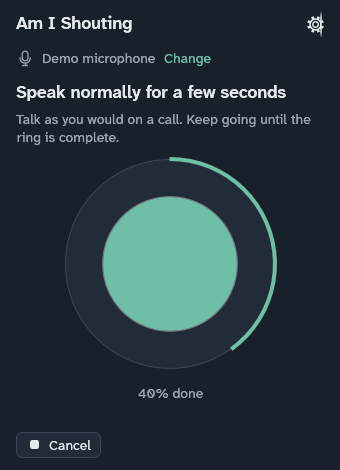
Speak in your normal call voice for a few seconds, with the microphone where it usually sits. That becomes your normal.
-
Start your call
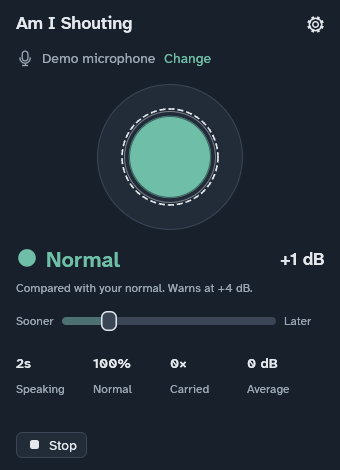
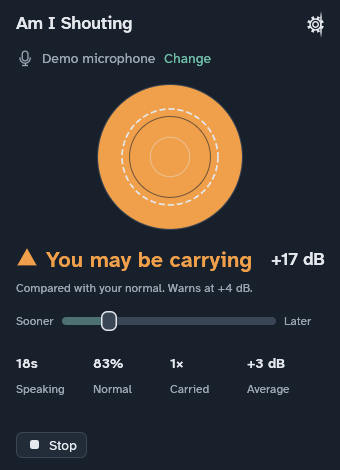
Turn monitoring on. The disc follows your voice; the dashed ring marks where a warning starts.
-
Glance, don't stare
If you stay louder than your normal, the window says so. A single laugh or a cough won't set it off.
A small window that stays out of the way
Nothing is recorded
The app measures how loud the room hears you, in memory, on your computer. It never records, saves or sends audio, and it doesn't know what you said.
Made for open offices
Works on Linux, macOS and Windows, with the microphone your laptop or webcam already has. Themes for light and dark, and an accessible display with larger text and stronger contrast.
Free for individuals. Organisations with more than four users pay £2 or $3 per installation per year. Pricing